Writing Sites Meta

Showing posts with label Tumblr. Show all posts

Google Blogger vs Tumblr Blog: Search Feature

Wednesday, April 3, 2019
What’s so useful and important about search boxes? Why should sites or blogs have a search feature? It’s important for sites and blogs to have a search function for the sake of their potential users and visitors.

Blogging Platforms, comparison and contrast series, Google Blogger, Informational Articles, Microblogging Platform, Platform Problems, Reviews, Social Networking Site, Tumblr,

People who come across your site and are searching for something specific should be able to easily find what they’re looking for by using the blog’s search box. They shouldn’t have to go through the entirety of your archives or articles list, if they don’t want to, just to find what they’re looking for.

You have to make things easy and convenient for your potential visitors and users because, otherwise, why would they bother to stay on your website or blog? With that said, you would expect platforms like Google Blogger and Tumblr to have a search feature, right? Let’s take a look at their search functions:

Google Blogger Search Feature

Google Blogger (blogging platform) has a built-in search feature, which you can easily add to your blog with no trouble or problem at all.

All you need to do is go to the design or layout part of your blog and choose to add a widget. Google Blogger offers the search feature as a gadget, which you can add in your site’s sidebar or footer. You can easily configure your search box by clicking on the edit widget link. You can name it and set it to search your blog, etc.

Tumblr Search = Laughable?

On the other hand, Tumblr’s search function, if you can call it that, pales in comparison to Google Blogger’s search feature. Seriously, it’s like they’re not fit to be mentioned in the same sentence. Why? What’s the problem with Tumblr’s search feature?

You Can Only Search for Tags on Tumblr

The biggest problem is how Tumblr only lets you search for tags. Who searches for tags? People don’t usually search for tags. Mostly, they search for keywords. Sure, some will search for tags, but they’ll also want to search for keywords alongside the tags.

Besides, it’s not like you can tag anything and everything on your Tumblr blog, so how can your visitors find what they’re looking for if they’re limited to searching by tags? Why does Tumblr set such an annoying limitation? How can this be useful at all?


If you want a decent and useful search feature, you obviously can’t make use of the built-in Tumblr search function, so you have to go through the trouble of looking around for possible alternatives and figuring out how to install or add it to your Tumblr blog. Needless to say, this is such an annoying and time-wasting hassle.

Update: Tumblr now lets you search using keywords, if you want to. However, from what I've experienced so far, it's just not as good as Google's search. Whenever I search for something on my Blogger blog, I always find what I'm looking for, even when I only type a single keyword.

Unfortunately, this is just not the case when it comes to Tumblr's search. Whenever I try to look for a post that I know is on my blog, I always have trouble finding it. I always have to try inputting several different combinations of keywords or look through pages of search results.

Sometimes, even then, I still won't end up finding what I'm looking for unless I go through each and every single page of my blog, which isn't feasible when I already have so many posts published.

Conclusion

Google Blogger definitely wins this round for having a superior search feature. Tumblr’s search function definitely needs a lot of improvement.

Your Thoughts and Opinions

What do you think? Feel free and welcome to share your thoughts and opinions by leaving a comment below.

*Notes:
- Image with added text was modified by Freya Yuki (CC:BY-SA) based on the image by Kazenokaze (CC:BY-SA) from deviantArt
- Image is meant to symbolize someone using the search box on their Google Blogger blog and trying to find a decent search feature for their Tumblr blog
- YouTube video shows you how to add the search box gadget to your Google Blogger blog
- This was previously published elsewhere

Google Blogger vs Tumblr Blog: Adding Text on Footer and Sidebar

Friday, March 29, 2019
What kind of information or text content can you put on your blog's or site’s footer and/or sidebar? Is it really necessary to have text on your footer or sidebar?

Do platforms like Google Blogger and Tumblr make it easy for you to add any text you want on your website’s footer or sidebar? How can you add text to your Google Blogger or Tumblr blog?

Blogging Platforms, comparison and contrast series, Google Blogger, Informational Articles, Microblogging Platform, Reviews, Social Networking Site, Tumblr, Platform Problems,

What Kind of Content Should You Put on Your Blog's Sidebar and Footer?

You can put all sorts of information or content on your blog or site’s footer or sidebar. This depends on what you want those places to have.

For instance, you could have a copyright notice, a disclosure notice, a short list of your most popular posts, a list of your tags or labels, and more. You can even have a short introductory message there or even a mini bio about the blog author or some short tidbit about your site.

Take a look at the following screenshots from some of my blogs for examples:

anime meta archives google blogger blog, sidebar, popular posts gadget widget feature, blogging platform

The sidebar of the the Anime Meta Archives blog makes use of Google Blogger's Popular Posts Gadget. The blog's top 10 posts are displayed with large thumbnails. The post title shows up as an overlay on top of the image. If you hover your mouse over the title, a tooltip with a short excerpt from the post will show up.

tumblr, blog, social networking site, microblogging platform, blogging, footer

My main Tumblr blog has a 2-column footer. Both have text content with links to the Disclosure, Disclaimer, Terms of Use, and Privacy Policy pages. The footer also includes a copyright and credits section.

Google Blogger Text Gadget

If you’re using Google Blogger (blogging platform), you can easily add any text to your site’s footer or sidebar. All you need to do is go to the layout part of your Blogger blog, then click on the “add a gadget” link.

From the list of widgets that will appear, just choose the Text gadget and click on the link to add it to your site (you can choose to add this to either your footer or sidebar or both).


Google Blogger’s Text gadget allows you to type any text message or content that you want to show on your blog or site. You can easily edit or delete this whenever you want.

Adding Content to Your Tumblr Blog's Sidebar and/or Footer

Tumblr (microblogging platform and social networking site), on the other hand, doesn’t make things easy for its users at all. First of all, it doesn’t even have any built-in gadgets or widgets, so if you’re looking for a Text gadget, don’t bother because you’ll just end up wasting your time.

I know, it’s horrible, isn’t it? Things would be so much better and easier if Tumblr was nice enough to offer its users a Text widget. Don’t you wonder why Tumblr isn’t user-friendly enough?

If you want text on your Tumblr blog’s footer or sidebar, you’ll have to take the time to search around for possible ways to get this done. So trying to insert text on your Tumblr blog footer or sidebar isn’t easy at all.

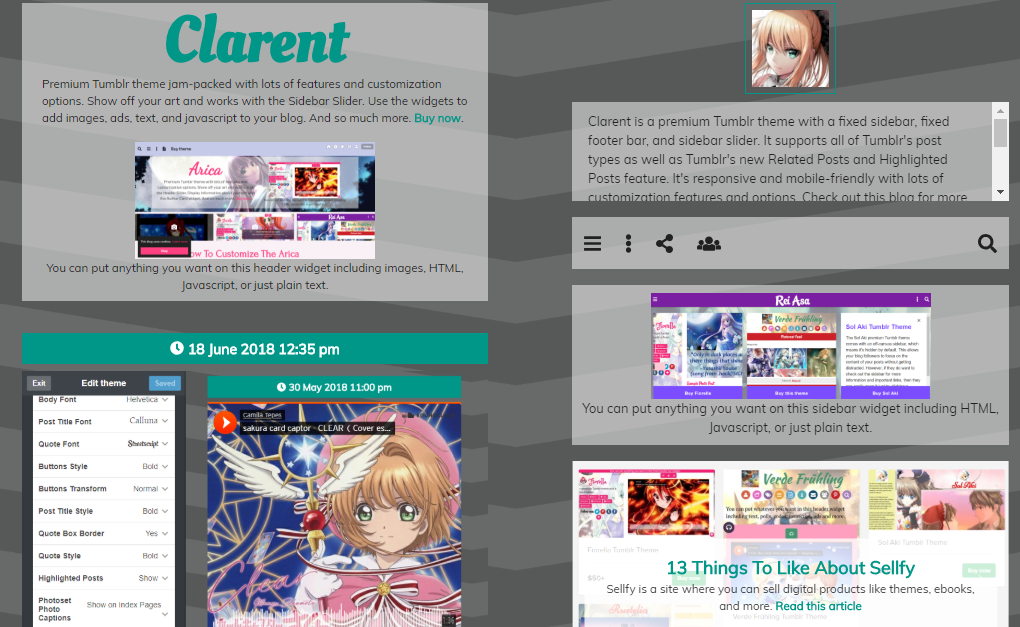
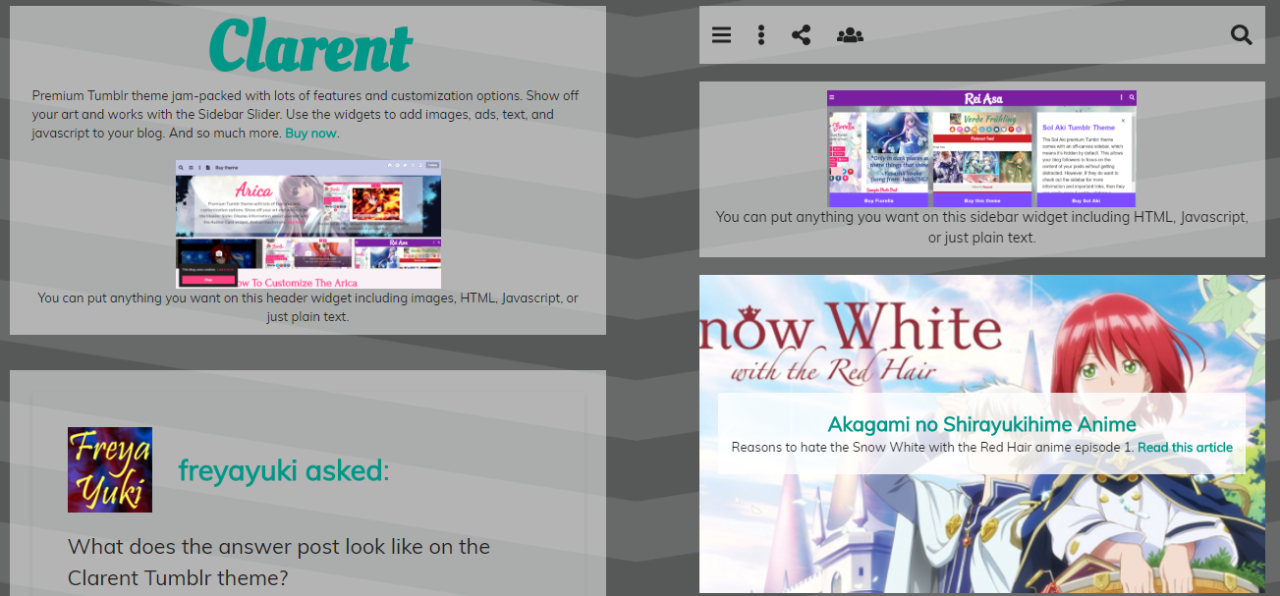
However, there are Tumblr themes that allow you to easily add content to the footer or sidebar of your blog without having to code anything. All you need to do after installing the theme is to go to the theme options page of your blog. Then just copy and paste whatever you want to add in the appropriate textbox. Have a look at the following screenshots for examples:

clarent premium tumblr theme, responsive, mobile-friendly, customizable, carousel, widget, sidebar, gumroad

You can put anything you want on the Clarent Tumblr Theme's sidebar widget, including HTML, Javascript, or just plain text.

clarent premium tumblr theme, responsive, mobile-friendly, customizable, carousel, widget, sidebar, gumroad, html, javascript

Clarent even comes with a carousel widget, which you can use to showcase your arts and works. Check out the demo blog here. Learn more about this theme here. Check out my Themes List for more responsive, mobile-friendly, and easily customizable Tumblr themes for your blog.

Conclusion

With Google Blogger, all you need to do is select the Text gadget, input your text, and that’s it. You don’t have to worry about HTML or codes or CSS. It’s no wonder that Google Blogger wins this round.

Looks like Tumblr needs a whole lot of improvement, right? Well, that is, unless you choose a Tumblr theme that comes with text widgets for the sidebar or footer of your blog.

What do you think about this? Feel free and welcome to share your thoughts and opinions by leaving a comment below.

*Notes:
- Image with added text was modified by Freya Yuki (CC:BY-SA) based on the image by hayashinomura (CC:BY-SA) from deviantArt
- Image is meant to symbolize someone trying to add text on their Google Blogger or Tumblr blog’s sidebar or footer
- YouTube video shows you how to add a Text gadget or widget to your Google Blogger blog’s sidebar or footer; it’s really easy
- This was previously published elsewhere

Google Blogger vs Tumblr Blog: Widgets and Gadgets Feature

Sunday, March 24, 2019
What are widgets? Why are they important? Why should Google Blogger and Tumblr offer their users gadgets to use on their blog or site? How does Tumblr fail to surpass Google Blogger when it comes to the use and availability of gadgets and widgets?

google blogger, blogging platform, social networking site, microblogging platform, tumblr, widgets, gadgets feature, versus, reviews, comparison and contrast, informational articles

Widgets and gadgets are useful features or tools that you can add to your blog. For example, you can have a labels gadget, which can show all the tags that you use on your site. You can even have an archives widget, which can show a list of all the posts or articles on your website.

Let’s take a look at the gadgets and widgets offered by Google Blogger and Tumblr and see which of the 2 is better:

Google Blogger has Numerous Gadgets and Widgets

Google Blogger (blogging platform) offers you a lot of gadgets that you can use for your Blogger site or blog. These widgets can all be useful and helpful to you.

For instance, Blogger has a Contact Us form, so your potential visitors can easily contact you or message you if they want to. You can even have a Follow By Email feature so people can easily subscribe to your site or blog.

Blogger also has a Search Box, Popular Posts, Poll feature, and a whole lot more awesome widgets. You can also easily add a text message to your blog’s footer or sidebar with the Text gadget. If you want to add codes, you can do so by using the HTML/JavaScript feature.


The best part is how easy and simple it is to add whatever widget you want. All you need to do is go to the layout part of your Google Blogger blog then click on the “add a gadget” link. You’ll then be shown a list of all the possible widgets that you can choose to add to your site.

To add your selected gadget, all you need to do is click on the gadget name or the plus image next to it. It will automatically be added to your site, and you can then change its settings or configure it to your liking.

Tumblr has Zero Gadgets or Widgets

On the other hand, Tumblr (microblogging platform and social networking site) is not user-friendly at all, not when it comes to gadgets or widgets.

That's right. Unfortunately, Tumblr doesn’t have any gadgets or widgets. So if you want features like adding text on your sidebar or footer, then you’ll have to go to your blog theme’s HTML and figure out how and where to insert the text you want.

google blogger, blogging platform, social networking site, microblogging platform, tumblr, widgets, gadgets feature, versus, reviews, comparison and contrast, informational articles

The same can be said for other features like the Follow By Email, Popular Posts, Contact Form, Polls, and more. If you want these things on your Tumblr blog, then you’re going to have to go through the trouble of researching and trying to find out how to add said feature to your site and it’s definitely not going to be easy.

Why does Tumblr have to make things so difficult for its users? If it offered gadgets and widgets like Google Blogger, things would be so much easier for people trying to fix and customize and modify their Tumblr blog theme.

With that said, Google Blogger definitely wins this round for having so many helpful and useful gadgets and widgets that you can easily add to your blog or website with a simple click.

*Notes:
- Image with added text was modified by Freya Yuki (CC:BY-SA) based on the image by Kazenokaze (CC:BY-SA) from deviantArt
- Image is meant to symbolize someone using the widgets offered by Google Blogger blog and trying to find working gadgets for their Tumblr blog
- Second pic is by Romain Toornier (CC:BY) from flickr
- YouTube video shows you how you can add Google Blogger gadgets to your blog; as you can see, you have what appears to be thousands of widgets to choose from
- This was previously published elsewhere

What to Like About Tumblr’s Signup or Registration Process?

Tuesday, March 19, 2019
Tumblr is a microblogging platform and social networking site with a pretty easy sign up or registration process.

Blogging Platforms, Informational Articles, Microblogging Platform, Reviews, Social Networking Site, Tumblr, Tutorials, Signup Process, register, create an account, create a blog

Seriously, it’s really quite simple and easy to create an account or a blog on Tumblr. But that’s not the only thing to like about the site’s signup process.

It’s Easy to Register or Create an Account on Tumblr

Tumblr makes its account creation process easy for all its potential users by simplifying things and presenting the necessary information a few at a time. For instance, when you get to the register page, you’ll only see three textboxes that you have to fill up.

This is better than having to see everything all at once and being overwhelmed and overloaded with too much information.

Blogging Platforms, Informational Articles, Microblogging Platform, Reviews, Social Networking Site, Tumblr, Tutorials, Signup Process, register, create an account, create a blog

It’s only after you fill up the 3 textboxes (which asks for your username, password, and email address) and click on the next button that you’ll be brought to another page where you can fill out the next set of required information.

Once you’re brought to the captcha page, you’ll have to grin at seeing the next button labeled as “almost done!”. And, indeed, the sign up process is almost over as you get taken to a ‘welcome to Tumblr’ page upon clicking the aforementioned button. This page asks you to make a blog.

Don’t Feel Pressured or Stressed About Having to Make a Tumblr Blog

You get to choose from a number of colorful headers, or you can just upload a photo. You can also add an avatar as well as a blog title and description.

But before you start panicking and stressing about how you’re not prepared to make a blog yet and how you thought you were just creating an account for now, Tumblr is quick to reassure you by saying “and don’t stress about it. You can change this stuff whenever”.

And that’s absolutely utterly perfect because, of course, you’d want to change all this stuff later on especially if you haven’t made up your mind yet on what your blog is going to be about or if you haven’t fully ironed out all of your blog details yet.


So you don’t even need to fill out anything on this page. You can just click on the “make it” button right away. After that, you can decide to follow some blogs or you can head straight to your Tumblr dashboard where you can start exploring and looking around already.

You can do a number of things now, but you do need to verify your email address before you can access the rest of Tumblr’s features.

You can check out my main Tumblr blog here. I also have a Harry Potter Plotholes Archives blog, a Hetalia Axis Powers Archives blog, and an anything-goes blog called Soyuz Mir.

I've also started making themes for Tumblr. These themes are all responsive and mobile-friendly. Check out my Themes page, Themes list, Themes blog, and my Author page.

Your Thoughts and Opinions

So, what about you? What do you think about Tumblr's signup or registration process? Do you like it? Do you have any blogs on Tumblr? Feel free and welcome to share your thoughts and opinions by leaving a comment below.

Note: info mentioned on this post was true when it was written, but Tumblr’s signup or registration process are subject to change without notice, so the info presented herein may no longer apply should Tumblr decide to change their account sign-up process.

*Notes:
- Image with added text was modified by Freya Yuki (CC:BY-SA) based on the image by clasesdeperiodismo (CC:BY-SA) from flickr
- Second pic is by Romain Toornier (CC:BY) from flickr
- This was previously published elsewhere

Why and How Tumblr’s Terms of Service and Privacy Policy Can Make You Smile?

Thursday, March 14, 2019
There are many things to like about Tumblr’s terms of service and privacy policy, one of which is how the site helpfully included annotations to help readers understand all the legal jargon.

tumblr, microblogging platform, social networking site, terms of use, terms of service, privacy policy, tos, reviews, blogging platform

Another thing to like is how Tumblr was able to inject some humor in some parts of its terms and policies.

Humorous Snippets in Tumblr TOS and Privacy Policy

Saying things like:

“Yahoo! owns us and we share”,

“Google search and the far superior Yahoo! search”,

“should we get acquired (again!)”,

or

“if we dissolve (no way)”

can certainly make you grin or smile in amusement, at the very least.

And this is why it’s not all that boring to read through all this stuff even if it is really quite long.

Tumblr Terms and Policies Are Easy to Understand

A lot of these terms and policies are also pretty easy enough to understand even without all the annotations, which is just as well since Tumblr’s minimum age requirement is 13.

So it’s good to see that this microblogging platform actually cares enough to make sure that all its potential users, no matter how young, will be able to easily understand and comprehend all these legal stuff as well as all their rules and guidelines.


Many parts of these terms and policies have been written in a friendly manner. You can really feel or hear the nice and friendly tone of voice, and it’s like having a conversation with someone who might not be your close friend, but who you wouldn’t mind listening to because of the friendly tone injected with the occasional fun humor.

Your Thoughts and Opinions

So, what about you? What do you think about this? Do you like the fun and humorous way that Tumblr wrote its terms of service and privacy policy? Feel free and welcome to share your thoughts and opinions by leaving a comment below.

Note: info mentioned on this post was true when it was written, but Tumblr’s terms and policies are subject to change without notice, so the info presented herein may no longer apply should Tumblr decide to change its legal info.

*Notes:
- Image with added text was modified by Freya Yuki (CC:BY-SA) based on the image by clasesdeperiodismo (CC:BY-SA) from flickr
- This was previously published elsewhere

What Can You Say About Tumblr? What Is There To Like Or Dislike About This Site?

Saturday, March 9, 2019
Tumblr is a microblogging platform and social networking site that’s pretty similar to Google Blogger and WordPress. Do you know anything about Tumblr?

tumblr, microblogging platform, social networking site, blog

What’s your opinion on this blogging platform? Do you like it, or do you dislike it? Why? Would you recommend this site to other people?

I've been looking for information about Tumblr and trying to find out more about it. It does seem quite interesting, so I've been wondering if I should try it out or not. I've been considering and deliberating on whether or not I should join the site.

From what I've heard and read about this website, it seems that Tumblr is a pretty good blogging platform and that there are many who are using this site.

It’s also apparently possible to place ads on your Tumblr blogs, and you can even include affiliate links as long as you're not spamming the site. The large community is also something to take note of.

Edited to add: yes, as long as you're not spamming, it's okay to put ads on your Tumblr blogs. You can also include affiliate links such as the ones from Amazon. And Tumblr does have a pretty large community.

So, if you had a choice, would you blog on Tumblr? It would be interesting to hear more opinions regarding this website.

Update: I've created an account on Tumblr. I now have several blogs there. I've even made several themes for Tumblr and am planning to make more.

Here are some comments about this post, back when it used to be posted elsewhere:

BarbRad wrote on August 3, 2014, 7:45 PM:
I currently have seven Tumblr blogs under two different profiles. For me it's more like Pinterest than the other sites you mentioned.

I don't see a lot of original material. It seems most of what comes through my feeds are posts reblogged from others. I reblog some again.

I think it's more of a curating site than a blogging site, but I guess you could blog there. Photos seem to do better than words. Maybe someone else could add to this.

I wish I knew which of my other friends were there. I'm following all people I don't know. I think it's hard to find followers there.

Freya Yuki replied to BarbRad on August 5, 2014, 3:44 PM:
Wow. That's a lot of blogs. The information I've been reading and seeing about Tumblr say you can post articles there and there are even some that mention SEO for Tumblr.

Yeah, I heard about reblogging, and it seems that a lot of people there are doing that. Is it really hard to find or get followers on Tumblr?

I heard the community there was vast and pretty nice or friendly, so I thought it might be nice to try to blog there so you can also socialize and get to know people who might share the same interests as you, etc. Looks like I need to do more research about Tumblr.

BarbRad replied to Freya Yuki on August 5, 2014, 9:38 PM:
It's easier to find people with common interests than it used to be. I just wish each blog could stand alone without having to be under a main account.

I opened two accounts to cover my nature and gardening blogs. The feed pretty much goes to the main blog.

Freya Yuki replied to BarbRad on August 6, 2014, 2:52 PM:
Thanks for the additional info. Yeah, I read that you can have a primary blog and several secondary ones, but that there were some limitations on what you can do with those secondary blogs.

Do you write long articles there or just short ones? Or do people just reblog and not write anything original? Is it all about images there? Or will articles also do well?

nbaquero wrote on August 5, 2014, 5:28 AM:
Freya Yuki, I have just used Tumbler to share my posts from another writing site, but beyond that, I have not really found it to be a great platform. As BarbRad says is more like Pinterest.

Freya Yuki replied to nbaquero on August 5, 2014, 3:55 PM:
Thanks for the information about Tumblr. How is sharing your articles from another site on Tumblr working out then? Can you recommend another blogging site that's similar to Tumblr then?

nbaquero replied to Freya Yuki on August 6, 2014, 3:56 AM:
Freya Yuki It's only given an extra view or two per article which is not much but helps, besides it is some sort of repository for my posts, as BarbRad indicated is more like a curating site.

I haven't explored enough to find sites similar to Tumblr, being used as blogging platforms, but I would say for a full blog you can go with Google Blogger or WordPress as you already mentioned.

Freya Yuki replied to nbaquero on August 7, 2014, 3:17 PM:
Ah, I see. But you can still write original articles there, right? You can't advertise on a free WordPress blog.

You'd have to go with the paid version to advertise, but there's no guarantee that it will be worth it, which is why it's best to go with a free blog first unless you have funds.

I've tried the free Google Blogger, but it doesn't seem to have any community at all, not for socializing or interacting anyway. I heard Tumblr was good for those things and that it has a nice community. Is that true?

It would be nice to, not just get readers for your posts, but also get the chance to interact and socialize with people like what happens in sites like this where people comment and have conversations with each other.

cmoneyspinner replied to Freya Yuki on March 31, 2015, 2:51 PM:
RE: Tumblr -
* Can you write original articles there? Yes.
* Can you advertise there? Yes.

RE: Blogger -
* Free Google Blogger doesn't seem to have any community at all …? True. But use it anyway.
Try to interface it with Google Plus, if you're on G+.

*Notes:
- Image is by Romain Toornier (CC:BY) from flickr
- This was previously published elsewhere on Monday, December 26, 2016 at 11:41 AM
How and Why Tumblr's Terms and Policies Can Make You Feel Welcome?

Monday, March 4, 2019
Okay, it’s been established (in another post anyway) - one of the things that makes Tumblr’s terms of service and privacy policy cool and likable is how it makes use of annotations to help readers understand all the legalese and legal jargon.

tumblr, microblogging platform, social networking site, terms of use, terms of service, tos, privacy policy, rules, guidelines, blogging platform

But, guess what? That’s not the only thing to like about Tumblr’s terms and policies. Another thing that makes all these stuff pretty awesome is the tone of voice that the site uses in order to explain everything to its users.

The tone of voice in the way Tumblr has written its terms, rules, guidelines, etc, comes across as quite friendly and many parts of these pages even have a humorous tilt or angle to it, all of which can make your smile or grin in amusement, at the very least.

For example, in the privacy policy page, you can find gems like:

"Should we happen to get acquired (again!) or go out of business (no way)"

or

"like Google Search, or the far superior Yahoo Search"

This one about Google and the others like it are extra amusing, not just because Yahoo! owns Tumblr, but also because Tumblr’s Blog Customization page includes a section on Google Analytics and how it can be used on a Tumblr blog.

In their account security page, they even recommend the Google authenticator app to be used for their 2-factor authentication feature.

Seeing things like this really makes reading all these legal stuff less of a troublesome chore. The friendly tone of voice and the humorous parts of these papers really help to prevent you from being bored to death.

And it can even make you feel welcome as this serves to paint Tumblr into a nice, friendly, and welcoming community.

Your Thoughts and Opinions

What about you? What do you think about all this? Feel free and welcome to share your thoughts and opinions by leaving a comment below.

*Notes:
- Image is by hayashinomura (CC:BY-SA) from deviantArt
- This was previously published elsewhere on Wednesday, December 14, 2016 at 11:39 AM
How Tumblr Is Different From Other Sites Based on Its Terms and Policies?

Wednesday, February 27, 2019
Why would I even be reading Tumblr’s (social networking site and microblogging platform) terms of service, privacy policies, guidelines, rules, and other such information anyway? Sounds like such a boring chore, huh?

tumblr, social networking site, microblogging platform, terms and policies, terms of use, terms of service, privacy policy

Actually, it’s not that bad. But let’s start with the first question. Tumblr seemed interesting enough to me, so I considered starting a blog on Tumblr.

(Update: I've started several blogs on Tumblr and have even made some themes)

Of course, before I registered or signed up, I first wanted to know all about its TOS, policies, rules, etc, so I know what I’m agreeing to and what to expect and what will be happening.

I thought reading all this would be like reading most of the usual terms and policies wherein everything would be full of legal jargon and it would take a while before you can finish reading all of them.

Why? Because, not only will these stuff be horrendously long, it will also be utterly boring and you’ll definitely be needing a break every now and then (because who can read all this in one sitting, right?).

It’s different with Tumblr though, and it’s a good kind of different. Of course, it still took me a while to read all those stuff because there’s a lot, and I've other things to do and take care of.

But reading all those terms and rules didn’t really feel like a chore at all, and it wasn’t all that boring either.

*Notes:
- Image is by tsukkaomi (CC:BY-SA) from deviantArt
- This was previously published elsewhere on Friday, December 2, 2016 at 11:37 AM

Why Reading Tumblr's Terms of Service and Privacy Policy Isn't Such a Boring Chore?

Friday, February 22, 2019
A website's (as well as programs, software, services, etc) terms of service and privacy policy is usually long, boring, and difficult to understand with all the legal jargon, so it's such a chore to read.

So when I find sites that have readable TOS and that actually make an effort to make all the legal stuff interesting and easy for their users to understand, I write about it.

How come reading all about Tumblr’s (microblogging platform and social networking site) terms of service or terms of use, privacy policy, rules, guidelines, etc isn’t such a boring chore?

What makes it so different from the usual terms and policies that you can see on other sites, programs or services?

tumblr, social networking site, microblogging platfrom, terms, policies, tos, privacy policy, terms of use, terms of service

Well, for starters, Tumblr’s terms of service and privacy policy actually have annotations.

These annotations make it easier for people to understand all the legal jargon and the like because the key points that you need to know are summarized in a way that doesn’t bore everyone to death.

This really makes it seem like Tumblr cares about its users and potential users and that it wants to make sure that everyone can easily understand all these agreements and policies and rules.

This makes them vastly different from many other sites who just list everything in a drab, boring, and dull manner and who can really come across as uncaring especially with how these websites don’t seem to care even if their users don’t understand a single word of what their TOS or policies say.

This perception is reinforced by how these sites seem to have no qualms using long and complicated words and legal jargon. Actually, Tumblr uses those kinds of words too, but it makes up for it by providing annotations.

*Notes:
- Image is by sayuko (CC:BY-SA) from deviantArt
- This was previously published elsewhere on Sunday, November 20, 2016 at 11:35 AM

3 Sites With Likable Terms And Policies

Saturday, February 17, 2018
Hey, guess what, Tumblr’s terms of service and privacy policy aren’t the only ones that I like. I've been writing a lot about Tumblr’s terms of use and policies, so, maybe, it seems like these are the only ones that I like.

But that’s totally not true at all 😃. It’s just that these are the ones I've recently read and liked. But the truth is that there are other terms and policies that I’ve read and liked. For example, I do like Persona Paper’s terms and policies (and I'm seriously not just saying that ‘cause I write here), and I intend to elaborate on that later on.
terms of service, terms of use, privacy policy, tos, picmonkey, photo editor, tumblr, blogging site, writing site, persona paper, microblogging platform, blogging platform
It’s on my list of stuff to write about, which seems to be growing more and more by the minute. Okay, that was a bit too much of an exaggeration, but there's definitely a lot that I want to write about and the list is definitely very long. In fact, I can’t wait to write them all, but just can’t seem to find the time to do so.

Aside from Persona Paper’s terms and policies, another one that I like is that of PicMonkey’s. PicMonkey is a free online photo editor that I don’t use. Actually, when I was reading through Tumblr’s terms and policies, I was reminded of PicMonkey’s terms and policies.

But it’s not because the two are all that similar or anything. It’s just because PicMonkey also has terms and policies that I actually like. It's quite short and pretty fun to read. What do you think about the terms and policies of these websites?

Here are some of the comments from this article, back when it used to be posted elsewhere:

SandraLynn wrote on August 12, 2014, 4:00 PM:
LOVE PICMONKEY. I'm a royale member AND an affiliate. It's a great deal - free or paid OR the affiliate... I was JUST freakin' there making a thing for my website. Funny that I happened over here right after :) I used PicMonkey for years and then said what the heck, I want more. And then, with my site, decided to earn some money, as well. It's been good so far! I like helping folks, they like helping folks. Win win :) YAY :)

Oh, and I don't know anything about tumblr, but I love it HERE, too :)

FreyaYuki replied to SandraLynn on August 16, 2014, 5:05 PM:
It's good that PicMonkey is working well for you as a photo editor. I didn't know that they have an affiliate program. I'm just getting started on Tumblr so don't know much about it yet. I like Persona Paper too :) .

Feisty56 wrote on August 12, 2014, 7:24 PM:
You've got me giggling with your like of PicMonkey's terms, but then saying it's a program you don't use. I'm going to have to watch myself when I read your posts -- but it'll be fun.

FreyaYuki replied to Feisty56 on August 16, 2014, 4:47 PM:
😃 I didn't think anyone would notice that. I read PicMonkey's terms when I considered using said online photo editor. And I did like the terms of use and privacy policy because it's so fun and humorous and it's not that long either. But I ended up using GIMP as a photo editor instead.

*Notes:
- Image is by FirmBee (Public Domain) from Pixabay
- This was previously published elsewhere